
The modern workspace is undergoing a quiet revolution. Walk into a contemporary office, a high-tech classroom, or a stylish home study, and you are less likely to see the bulky black boxes of the past humming loudly beneath desks. Instead, technology is becoming streamlined, merging into the background to let productivity take center stage. For decision-makers and everyday users alike, the dilemma of choosing the right hardware is real. The debate between the sleek all-in-one and the powerhouse desktop pc is not just about aesthetics; it is about defining how you interact with your digital world.
As an industry veteran deeply involved in the manufacturing of computing solutions, I have witnessed the shift in consumer behavior and corporate sourcing firsthand. Whether you are outfitting a school district or setting up a high-performance editing suite, understanding the nuances between these two form factors is critical. This article is worth reading because we will peel back the casing—literally and figuratively—to reveal the engineering realities, the pros and cons, and the long-term value of each system to help you find the right fit for your specific requirements.
What Exactly is an All-in-One Computer and How Does It Differ from a Traditional Desktop PC?
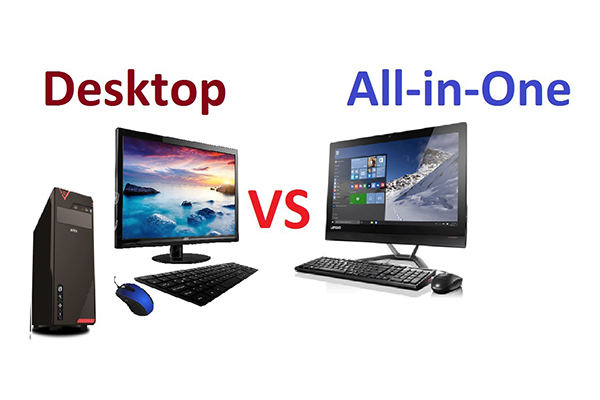
To understand the debate between all-in-one and tower systems, we must first define the architecture. A traditional desktop pc consists of separate components: the computer tower (which houses the motherboard, cpu, graphics card, and storage) and a separate monitor, keyboard, and mouse. It is a modular system where every piece is distinct.
In contrast, an all-in-one computer (often called an AIO or AIO computer) integrates the internal computer components behind the display panel. It is a single unit that combines the computer and display. This engineering marvel means that the processing unit, speakers, and webcam are all built into the monitor's chassis.
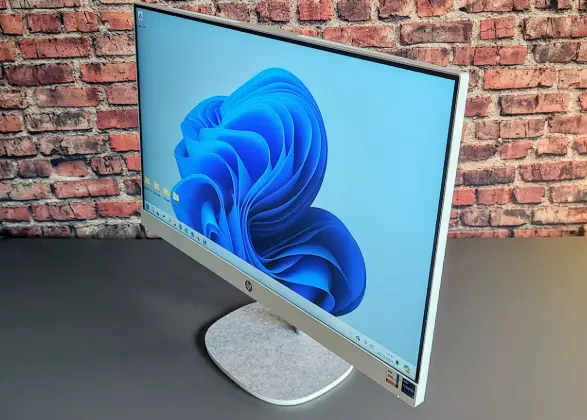
The primary difference lies in the form factor. Desktop pcs prioritize space for airflow and expansion, resulting in a larger footprint. All-in-one pcs, however, borrow heavily from laptop architecture, utilizing distinct layouts to fit everything into a slim profile. This fundamental difference dictates everything from performance to upgradeability.
Why Choose a Desktop PC If You Need Maximum Performance for Demanding Tasks?
If your daily routine involves rendering 4K video, running complex simulations, or high-end gaming, the traditional desktop is usually the undisputed king. Desktop pcs offer a significant advantage in raw power. Because they have a larger chassis, they can accommodate more powerful components that generate more heat.
A desktop tower allows for a robust cooling system. Large fans and heatsinks move air efficiently, preventing the processor and graphics card from thermal throttling (slowing down to prevent overheating). In demanding applications, maintaining peak clock speeds is essential.
Furthermore, desktop pcs can utilize full-sized, desktop-grade components. All-in-one computers combine tight spaces with heat concerns, often forcing manufacturers to use mobile-grade parts—similar to what you find in a laptop—to keep temperatures down. While modern mobile chips are fast, a high-wattage desktop cpu will generally provide better performance for sustained, heavy workloads. If you need portable power that rivals a desktop, you might look at something like the 15.6 Inch Laptop I71060NG7, but for pure stationary power, the tower wins.
Are All-in-One PCs the Best Computer Solution for a Minimalist Workspace?
For many users, the clutter of a traditional computer setup is a major pain point. A tower requires a power cable, a video cable to the monitor, and USB cables for peripherals. It creates a "spaghetti" of wires behind the desk. This is where the all-in-one pc shines.
An AIO desktop is the epitome of a streamline workflow. Typically, there is only one cable: the power cord. If you use a wireless keyboard and mouse, your desk remains pristine. This space-saving design makes AIOs perfect for reception areas, medical carts, or small home offices where real estate is at a premium.
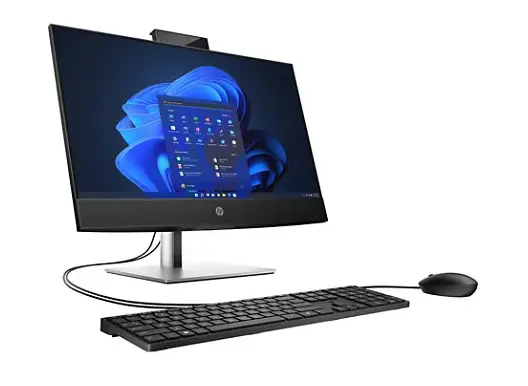
The sleek appearance of an AIO also adds a touch of professionalism. It looks modern and sophisticated. When you compare all-in-one setups to bulky towers, the aesthetic difference is stark. For businesses that want to project a high-tech image to clients, an all-in-one computer is often the best computer choice.
How Does Upgradability Compare Between an AIO Desktop and a Traditional Desktop PC?
The most significant trade-off when you buy an AIO is upgradeability. In a traditional desktop pc, the customization options are nearly endless. You can open the side panel and swap out the graphics card for a newer model, add more storage drives, or even replace the motherboard and cpu years down the line. This allows you to extend the life of the machine without having to replace the entire system.
Unlike traditional desktops, all-in-one pcs are notoriously difficult to upgrade. Because the components are packed tightly inside an aio, accessing them can be a challenge. Often, the processor and graphics are soldered directly to the board.
Usually, the only upgrade options on an AIO are the ram (memory) and the storage (SSD/HDD). However, even these can be difficult to reach behind the screen. If you are someone who likes to tinker or needs to stay on the bleeding edge of technology without buying a new computer every three years, a desktop pc is the better suited option.
Is an All-in-One Computer Easier to Move and Set Up Than a Desktop Tower?
Imagine you are an IT manager deploying 50 computers in a new office, or a student moving into a dorm. The logistics of moving desktop pcs can be a nightmare. You have to transport the desktop tower, the monitor, and ensure all the connecting cables don't get lost.
An all-in-one computer is significantly easier to move. It is a single unit. You simply unplug it, pick it up, and go. Setting it up is just as fast—plug it in, turn it on, and you are ready to work. This plug-and-play nature makes AIOs incredibly popular in educational settings and dynamic work environments where seating arrangements might change.
While they are not as portable as a laptop, like our 14 inisi komepiuta s07, they offer a nice middle ground. They provide the stability and screen size of a desktop with a fraction of the setup hassle. This convenience is a major factor in the pc vs AIO decision-making process.
Can You Game on an AIO Computer or Should You Stick to Desktop PCs?
Gaming is a category where the desktop pc vs AIO battle usually has a clear winner. Modern gaming requires powerful graphics cards and excellent cooling. While some high-end AIO desktops come with dedicated GPUs, they are often mobile versions designed to fit in the slim case.
For casual gaming—think League of Legends or Minecraft—an all-in-one pc is perfectly capable. However, for AAA titles that demand high frame rates and ultra-settings, an AIO will likely struggle with heat and performance. The cooling system simply cannot displace the heat fast enough, leading to loud fan noise and hot chassis.
If gaming is a priority, choose a desktop pc. The ability to install a full-sized GPU and upgrade it later is crucial. However, if you are a casual gamer who values a sleek desk over ultra-performance, an AIO can still serve you well. Alternatively, high-performance laptops like the 16 Inch Laptop Ds160n95 offer a balance of portability and power that some AIOs lack.
What Are the Pros and Cons of the Display in an All-in-One vs Desktop PC Setup?
The display is the centerpiece of an all-in-one computer. Manufacturers often equip these machines with high-quality, vibrant IPS panels, sometimes even featuring touchscreen capabilities. A touchscreen AIO adds a layer of interactivity that is great for creative work, point-of-sale systems, or educational apps.
However, there is a catch. In an AIO, the monitor is tied to the computer. If the screen cracks or the backlight fails, you often have to repair the entire computer, leaving you without a machine for days. With a traditional desktop, if your monitor dies, you simply buy a new one and keep using your PC.
Additionally, desktop pcs offer more flexibility in screen choice. You can choose an ultra-wide monitor, a high-refresh-rate gaming monitor, or a color-accurate professional display. With an AIO, you are stuck with what comes in the box. That said, for general use, the displays on modern AIOs are usually excellent and calibrated well for the average user.
Which System Provides Better Value for Money: AIOs or Traditional Computers?
When you compare all-in-one prices to desktop pcs, it can be tricky. At first glance, desktop pcs seem cheaper. You can get a tower with decent specs for a lower price than a comparable AIO. However, you have to factor in the cost of the peripheral devices.
When you buy a desktop tower, you often still need to buy a monitor, a webcam, and speakers. An all-in-one computer includes all of these in the purchase price. For a business buying 100 units, the simplified procurement of one computer box containing everything can save administrative time and hidden costs.
However, the long-term value of a desktop pc is often higher because of upgradeability. Extending a PC's life by two years with a simple RAM upgrade is cheaper than buying a whole new computer. Therefore, AIOs might have a higher upfront convenience value, while desktop pcs offer better long-term TCO (Total Cost of Ownership).
Who Should Buy an All-in-One PC and Who Needs a Traditional Desktop PC?
The decision ultimately depends on your specific needs.
- Choose an All-in-One if: You have a small desk, you value a clean and sleek aesthetic, you want a touchscreen, or you are equipping a public-facing area like a reception desk. They are also fantastic for general home office users who want a simple, effective machine for web browsing and media.
- Choose a Desktop PC if: You are a gamer, a video editor, a 3D artist, or a power user who needs maximum customization. If you plan to upgrade your components in the future or need to drive multiple 4K monitors, the traditional desktop pc is the one is right for you.
For industrial environments where durability is key, standard consumer AIOs might not cut it. In those cases, looking at specialized hardware like our 10.1 Inch sali le laulau gs10n or rugged laptops is a smarter move than either a standard AIO or desktop.
Making the Final Decision: Which One Is Right for Your Computing Needs?
In the debate between all-in-one and desktop pc, there is no single winner. It is about matching the tool to the task. The all-in-one computer has matured into a powerful, elegant machine that handles 90% of what average users need. It simplifies the computer setup and looks good doing it. The desktop pc, however, remains the workhorse for those who refuse to compromise on performance or upgradeability.
When shopping for a new computer, consider the space-saving design versus the need for raw power. Think about whether you want to deal with multiple cables or just one.
Key Takeaways:
- Aesthetics: AIOs win on style and minimal cabling; desktops are bulkier but functional.
- Performance: Desktop PCs generally provide better performance for the price, especially for gaming and rendering.
- Upgrades: Desktops allow for easy component swaps; AIOs are mostly fixed systems.
- Convenience: AIOs are easier to move and set up (plug-and-play).
- Flexibility: Desktops allow you to choose your own monitor and peripherals.
- Reliability: Desktop components run cooler, potentially lasting longer, but AIOs are reliable for standard office work.
Whether you opt for the compact desktop elegance of an all-in-one or the raw modularity of a traditional desktop, the market today offers incredible options to suit your workflow.
Post time: Jan-12-2026